> This page location: Neon platform > Access & collaboration > API keys
> Full Neon documentation index: https://neon.com/docs/llms.txt
> IMPORTANT: If this page contains inaccurate or outdated information, report it: POST to https://neon.com/api/docs-feedback with {"feedback": "describe the issue", "path": "/docs/manage/api-keys"}
# Manage API Keys
Most actions performed in the Neon Console can also be performed using the [Neon API](https://api-docs.neon.tech/reference/getting-started-with-neon-api). You'll need an API key to validate your requests. Each key is a randomly-generated 64-bit token that you must include when calling Neon API methods. All keys remain valid until deliberately revoked.
## Types of API keys
Neon supports three types of API keys:
| Key Type | Who Can Create | Scope | Validity |
| ---------------------- | --------------------------- | ---------------------------------------------------- | ------------------------------------------------------------------------ |
| Personal API Key | Any user | All organization projects where the user is a member | Valid until revoked; org project access ends if user leaves organization |
| Organization API Key | Organization administrators | All projects within the organization | Valid until revoked |
| Project-scoped API Key | Any organization member | Single specified project | Valid until revoked or project leaves organization |
While there is no strict limit on the number of API keys you can create, we recommend keeping it under 10,000 per Neon account.
## Creating API keys
You'll need to create your first API key from the Neon Console, where you are already authenticated. You can then use that key to generate new keys from the API.
> When creating API keys from the Neon Console, the secret token will be displayed only once. Copy it immediately and store it securely in a credential manager (like AWS Key Management Service or Azure Key Vault); you won't be able to retrieve it later. If you lose an API key, you'll need to revoke it and create a new one.
**Important:** You are responsible for maintaining the records and associations of any API keys in your environment and systems.
### Create a personal API key
You can create a personal API key in the Neon Console or using the Neon API.
Tab: Console
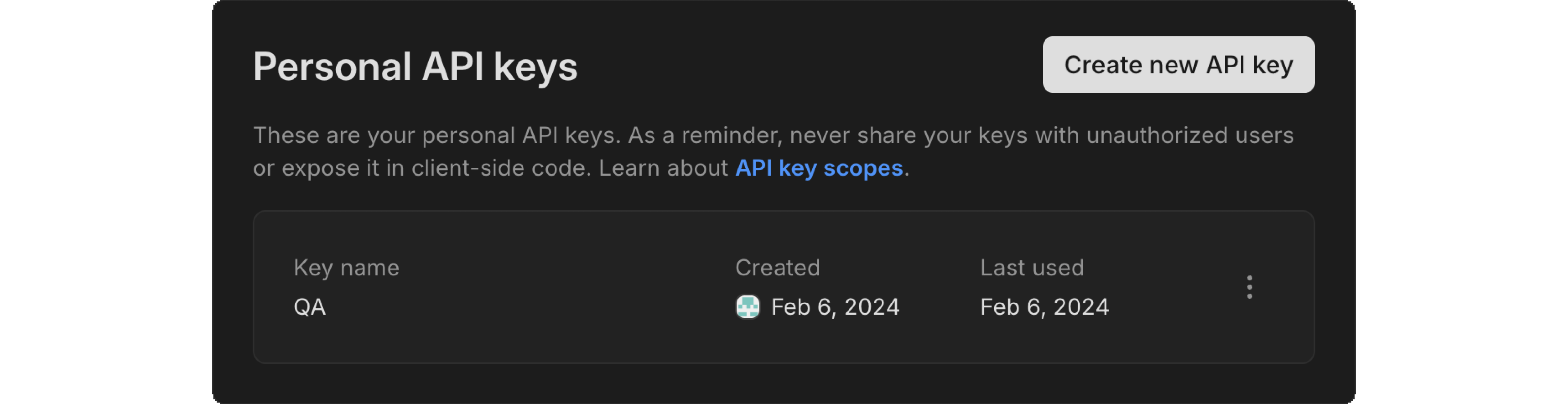
In the Neon Console, select **Account settings** > **API keys**. You'll see a list of any existing keys, along with the button to create a new key.
Tab: API
You'll need an existing personal key (create one from the Neon Console) in order to create new keys using the API. If you've got a key ready, you can use the following request to generate new keys:
```bash
curl https://console.neon.tech/api/v2/api_keys
-H "Content-Type: application/json"
-H "Authorization: Bearer $PERSONAL_API_KEY"
-d '{"key_name": "my-key"}'
```
**Parameters:**
- `key_name`: A descriptive name for the API key (for example, "development", "staging", "ci-pipeline")
**Response:**
```json
{
"id": 177630,
"key": "neon_api_key_1234567890abcdef1234567890abcdef"
}
```
To view the API documentation for this method, refer to the [Neon API reference](https://api-docs.neon.tech/reference/createapikey).
### Create an organization API key
Organization API keys provide admin-level access to all organization resources. Only organization admins can create these keys. To create an organization API key, you must use your personal API key and be an administrator in the organization. Neon will verify your admin status before allowing the key creation.
For more detail about organization-related methods, see [Organization API Keys](https://neon.com/docs/manage/orgs-api#api-keys).
Tab: Console
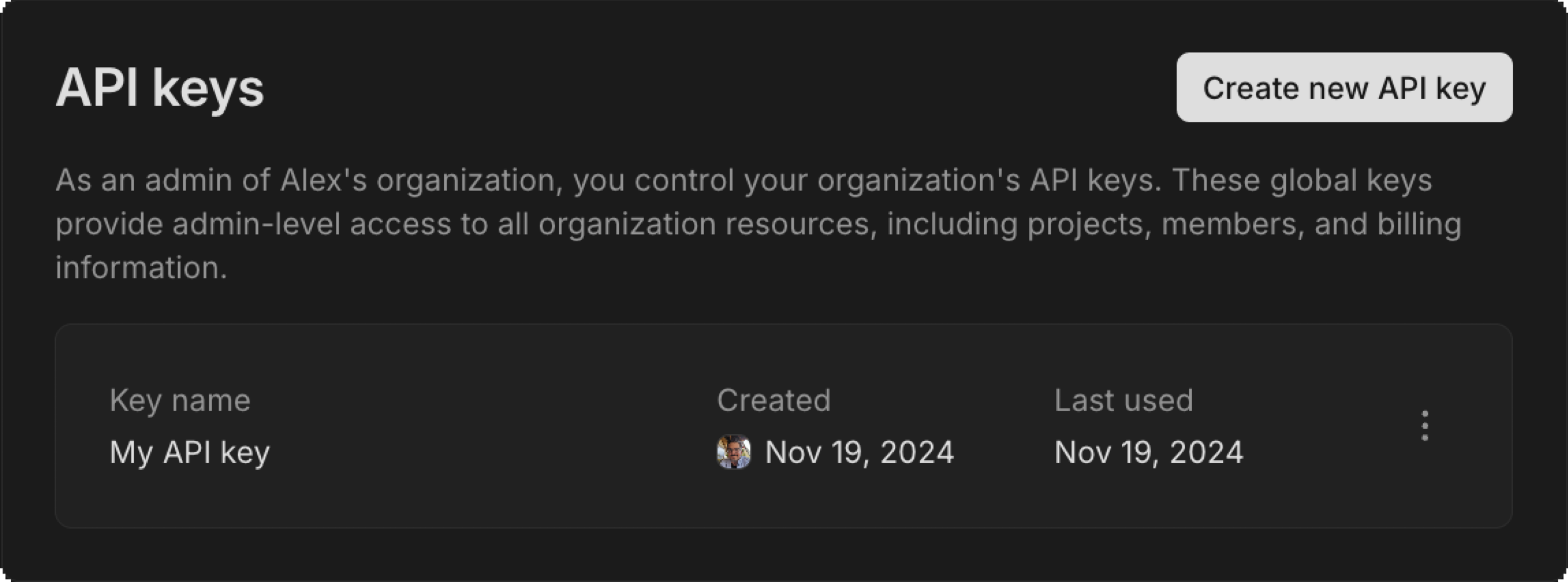
Navigate to your organization's **Settings** > **API keys** to view a list of existing keys and the button to create a new key.
Tab: API
To create an organization API key via the API, you need to use your personal API key. You also need to have admin-level permissions in the specified organization. This endpoint is rate limited to 10 requests per second; if you create many keys, throttle your requests or use retries with backoff.
```bash
curl --request POST \
--url 'https://console.neon.tech/api/v2/organizations/{org_id}/api_keys' \
--header 'Content-Type: application/json' \
--header 'Authorization: Bearer $PERSONAL_API_KEY' \
--data '{"key_name": "orgkey"}'
```
**Response:**
```json
{
"id": 165434,
"key": "neon_org_key_1234567890abcdef1234567890abcdef",
"name": "orgkey",
"created_at": "2022-11-15T20:13:35Z",
"created_by": "user_01h84bfr2npa81rn8h8jzz8mx4"
}
```
### Create project-scoped organization API keys
Project-scoped API keys have [member-level access](https://neon.com/docs/manage/organizations#user-roles-and-permissions), meaning they **cannot** delete the project they are associated with. These keys:
- Can only access and manage the specified project
- Cannot perform organization-related actions or create new projects
- Will stop working if the project is transferred out of the organization
Tab: Console
In your organization's **Settings** > **API keys**, click **Create new** and select **Project-scoped** to create a key for your chosen project.

Tab: API
Any organization member can create an API key for any organization-owned project using the following command:
```bash
curl --request POST \
--url 'https://console.neon.tech/api/v2/organizations/{org_id}/api_keys' \
--header 'Content-Type: application/json' \
--header 'Authorization: Bearer $PERSONAL_API_KEY' \
--data '{"key_name":"only-this-project", "project_id": "some-project-123"}'
```
**Parameters:**
- `org_id`: The ID of your organization
- `key_name`: A descriptive name for the API key
- `project_id`: The ID of the project to which the API key will be scoped
**Example Response:**
```json
{
"id": 1904821,
"key": "neon_project_key_1234567890abcdef1234567890abcdef",
"name": "test-project-scope",
"created_at": "2024-12-11T21:34:58Z",
"created_by": "user_01h84bfr2npa81rn8h8jzz8mx4",
"project_id": "project-id-123"
}
```
## Make an API call
The following example demonstrates how to use your API key to retrieve projects:
```bash
curl 'https://console.neon.tech/api/v2/projects' \
-H 'Accept: application/json' \
-H "Authorization: Bearer $NEON_API_KEY" | jq
```
where:
- `"https://console.neon.tech/api/v2/projects"` is the resource URL, which includes the base URL for the Neon API and the `/projects` endpoint.
- The `"Accept: application/json"` in the header specifies the accepted response type.
- The `Authorization: Bearer $NEON_API_KEY` entry in the header specifies your API key. Replace `$NEON_API_KEY` with an actual 64-bit API key. A request without this header, or containing an invalid or revoked API key, fails and returns a `401 Unauthorized` HTTP status code.
- [`jq`](https://stedolan.github.io/jq/) is an optional third-party tool that formats the JSON response, making it easier to read.
Response body
For attribute definitions, find the [Retrieve project details](https://api-docs.neon.tech/reference/getproject) endpoint in the [Neon API Reference](https://api-docs.neon.tech/reference/getting-started-with-neon-api). Definitions are provided in the **Responses** section.
```json
{
"projects": [
{
"cpu_used_sec": 0,
"id": "purple-shape-411361",
"platform_id": "aws",
"region_id": "aws-us-east-2",
"name": "purple-shape-411361",
"provisioner": "k8s-pod",
"pg_version": 15,
"locked": false,
"created_at": "2023-01-03T18:22:56Z",
"updated_at": "2023-01-03T18:22:56Z",
"proxy_host": "us-east-2.aws.neon.tech",
"branch_logical_size_limit": 3072
}
]
}
```
Refer to the [Neon API reference](https://api-docs.neon.tech/reference/getting-started-with-neon-api) for other supported Neon API methods.
## List API keys
Tab: Console
Navigate to **Account settings** > **API keys** to view your personal API keys, or your organization's **Settings** > **API keys** to view organization API keys.
Tab: API
For personal API keys:
```bash
curl "https://console.neon.tech/api/v2/api_keys" \
-H "Authorization: Bearer $NEON_API_KEY" \
-H "Accept: application/json" | jq
```
For organization API keys:
```bash
curl "https://console.neon.tech/api/v2/organizations/{org_id}/api_keys" \
-H "Authorization: Bearer $NEON_API_KEY" \
-H "Accept: application/json" | jq
```
## Revoke API Keys
You should revoke API keys that are no longer needed or if you suspect a key may have been compromised. Key details:
- The action is immediate and permanent
- All API requests using the revoked key will fail with a 401 Unauthorized error
- The key cannot be reactivated; you'll need to create a new key if access is needed again
### Who can revoke keys
- Personal API keys can only be revoked by the account owner
- Organization API keys can be revoked by organization admins
- Project-scoped keys can be revoked by organization admins
Tab: Console
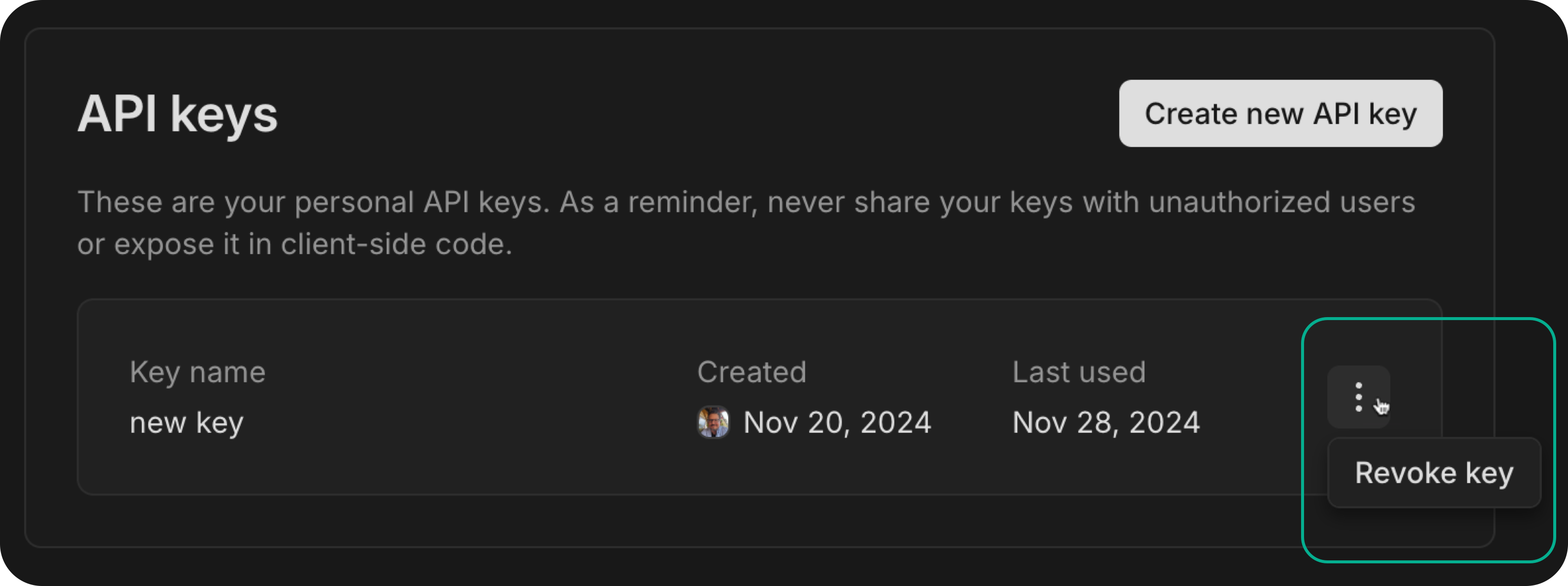
In the Neon Console, navigate to **Account settings** > **API keys** and click **Revoke** next to the key you want to revoke. The key will be immediately revoked. Any request that uses this key will now fail.
Tab: API
The following Neon API method revokes the specified API key. The `key_id` is a required parameter:
```bash
curl -X DELETE \
'https://console.neon.tech/api/v2/api_keys/177630' \
-H "Accept: application/json" \
-H "Authorization: Bearer $NEON_API_KEY" | jq
```
Response body
For attribute definitions, find the [Revoke API key](https://api-docs.neon.tech/reference/revokeapikey) endpoint in the [Neon API Reference](https://api-docs.neon.tech/reference/getting-started-with-neon-api). Definitions are provided in the **Responses** section.
```json
{
"id": 177630,
"name": "mykey",
"revoked": true,
"last_used_at": "2022-12-23T23:38:35Z",
"last_used_from_addr": "192.0.2.21"
}
```
To view the API documentation for this method, refer to the [Neon API reference](https://api-docs.neon.tech/reference/createapikey).
---
## Related docs (Access & collaboration)
- [Accounts](https://neon.com/docs/manage/accounts)
- [User permissions](https://neon.com/docs/manage/user-permissions)
- [Organizations](https://neon.com/docs/manage/organizations)
- [Project collaboration](https://neon.com/docs/guides/project-collaboration-guide)
- [Database access](https://neon.com/docs/manage/database-access)
- [Account recovery](https://neon.com/docs/manage/account-recovery)